Pages

Blogger Store

( Demo | Download )

This template is amazing! Featuring SimpleCart integration and a custom layout for posts. It's even possible to customize elements using the Blogger Template Designer! An original design by JavaTemplates.

Apple I

( Demo | Download )
Ideal template for Apple gadget lover.

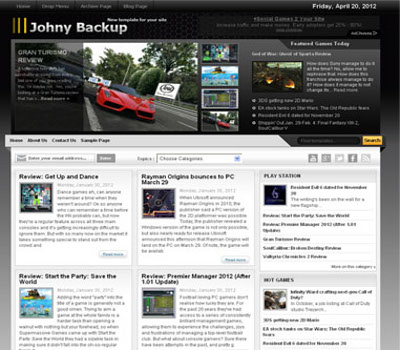
Johny Backup

( Demo | Download )

MagzEvo

( Demo | Download )

MoneyZine

( Demo | Download )

Wood Lover

( Demo | Download )

TravelSite

( Demo | Download )

Instinct

( Demo | Download )

Design Office

( Demo | Download )

Creatica

( Demo | Download )

Contrive

( Demo | Download )

Android Mania

( Demo | Download )

ColorMagazine

( Demo | Download )

Amazing Mind Reading Trick Revealed

Do you born with psychic abilities?

It is known that people with psychic abilities can predict the future of person they met. These people can learn the deepest secrets hidden in other people's heart.

Recently, there is one person, named Dave from Belgium, gifted with such amazing psychic abilities. Dave can even know the favorite color, best friend's name or even bank account number of any stranger he met! Dave reveals his mind reading tricks in YouTube, and claim that even the most ordinary person can perform the same trick.

The video is titled as "Amazing Mind Reader Reveals His Gift." People passing by the streets of Brussels are randomly chosen. They are asked for participation of upcoming TV program, featuring Dave, the gifted clairvoyant.

Participant are gathered in a white tent. The mind reading trick is performed to these participants, one by one.

Dave hugs and dance around the participant, gathering the spiritual energy flowing in their body.

Afterwards, Dave starts to reveal their secrets.

#1:
"I see a school, in Antwerp. I feel two insects (butterfly tattoo) on your back.
Last month, you spend $200 on alcohol."

#2:
"An orange bicycle.
A house for sale, $795,000."

#3:
"Your best friend, Julie.
Last month, you spend $300 on cloth."

#4:
"Interesting love live, with 4 people."

#5:
"How is your torn muscle?
I see money and transactions, with a negative balance.
Do you know your bank account number? I do. 9-7-8-5-4-1..."

#6:
"I see a red house with white balcony."

And finally, as curtain drops, the truth behind magic is revealed.

All participants are astonished. A group of men in black wearing ski mask, searching their social network and personal blog for their personal information.

Moral of story: Never revealed too much of your personal information. Because Internet fraudsters are everywhere, abusing your information for their purpose.

How Blogging Is Making You Fat

Do you have fat belly? Considering that many bloggers spend more than one-third of our lives on the chair, blogging is definitely a sure-fire way to impact our health and weight. Here is a complete guide to help you identify the main reasons that makes your belly fat, and provide fix for fat loss.

Reason #1: You Usually Go Out For Lunch

Whether you are part time or full time blogger, it is our pride to share pictures of 'special lunch in restaurant of the day' in our blog and social network. According to a study published in Journal of the Academy of Nutrition and Dietetics, obesity is strongly related to habit of eating lunch out. Those who eat lunch out often gain 10 more pounds than those less often.

The Fix: If you have to eat lunch outside, go for restaurant with more healthier option food. The quickest way to lose weight fast is to make yourself a diet plan. You need to know exactly what you eat to avoid high calories food. Occasionally you can go for vegetarian food restaurant.

Reason #2: You Do Not Know When To Stop Blogging

You should stop blogging when you have:
  • No purpose
  • No time
  • Over-committed
  • Looking for quick ROI (Return On Investment)
  • No temperament
  • Emotional/Stressed
  • Bored
Over-committed in blogging is not a good thing. It makes you feel stressful, harder to sleep and ultimately affect your health and weight.

The Fix: If you have any traits above, it is time to take a rest.


Reason #3: You Type All Day Long

Sitting and typing the whole day is not healthy. You only lift your finger, but not your body. Answer this question honestly: How many hours do you sit each day in front of:
  • Computer
  • Phone
  • Car
  • Meals
  • TV
"The hours you spend on chair is more than on bed!"

According to data from National Health and Nutrition Examination Surveys, there are 9 out of 10 people have 'Sitting Disease', the main cause of:
  • Weight gain
  • Diabetes
  • Cardiovascular disease
  • Cancer
The Fix: Time to change. Cutting down your sitting time can burn your fat, cure 'Sitting Disease' and improve your life expectancy. You can reduce sitting time by:
  • Stand up in front of computer 1 hour --> increase 0.7 years of life expectancy
  • Walk while playing with phone 2 hours --> increase 1.4 years of life expectancy
  • Jogging instead of driving car 3 hours --> increase 2.1 years of life expectancy
  • Exercise your body before meals 4 hours --> increase 2.8 years of life expectancy
  • Perform yoga while watching TV 5 hours --> increase 3.5 years of life expectancy 
  • Follows all steps above --> increase 10.5 years of life expectancy in total --> Exercise to lose weight fast in 10 days!

Change Comment Link Under Homepage Blog Post

My blog is still new and having little traffic. It certainly does not look good to show No Comment under every blog post, because nobody like to be the first person to give comment. So I decided to hide the number of comment. Here is how I tweak the text of comment link:

1. Click Template > Edit HTML > Proceed > Expand Widget Templates.

2. Ctrl + F to find the html code and change red code:
<span class='post-comment-link'>
<b:if cond='data:blog.pageType != "item"'>
<b:if cond='data:post.allowComments'>
<a class='comment-link' expr:href='data:post.addCommentUrl' expr:onclick='data:post.addCommentOnclick'>Our Reader Comments</a>
</b:if>
</b:if>
</span>
Notes: Alternatively, you can remove the text to hide the add comment link.

3. Click Save template.

Show Star Rating For Every Blog Post

Star Rating is a beta feature of blogger, with less than 1% of people using it. Why?

This beta feature can be activated in Blogger Draft mode, through Layout > Blog Post > Edit. However, it only worked for default blogger template. And everyone is using customize blogger template now.

If you are customized blogger template user, you have come to the right place. Because I am about to show you how to add star rating widget with just two lines of HTML codes.

1. Click Template > Edit HTML > Proceed > Expand Widget Templates.

2. Ctrl + F to find highlighted code and add extra code:
          <b:include data='post' name='shareButtons'/>
        </b:if>
      </div> </div>
<div class='js-kit-rating' expr:path='data:post.url' expr:permalink='data:post.url' expr:title='data:post.title'/>

<script src="http://js-kit.com/ratings.js"></script>
</body>

3. Click Save template.

Create XML Sitemap Or HTML Site Map?

Nowadays, people seems to confuse between XML sitemap and HTML site map. Below is short explanation:

XML sitemap: It is basically a XML file. It contains list of URL of your blog. It is only useful to help Google search engine spider to crawl your blog and discover new pages.

HTML site map: It is basically your HTML widget. You can interlink all your URL in your blog post or widget, so that Google search engine spider can easily crawl your blog. Additionally, visitor like it because they can easily find out all the contents of your blog. Visitors are scanner, they scan through all your stuff to find out only the subject that interest them the most.

Now you may want to ask, XML Sitemap VS HTML Site Map, which one of them better for Google search engine?

Answer is both of them are great! If you really want to make comparison, HTML site map is more useful. Your blog should aim for visitors, not just Google search engine spider.

Here I will walk you through simple steps to submit sitemap to Google.

1. Log in to Google Webmaster.

2. Click your blog URL > Sitemaps > Add/Test Sitemap

3. /feeds/posts/default?max-results=500

4. Submit Sitemap

Keep in mind that there is no guarantee that all the URL will be indexed by going through the described method.

Create Image Hyperlink in Blogger Template

In previous tutorial, you have learnt how to make image unclickable, because they are not meant to be clicked by people visiting your blog. But sometimes, you may want to use image hyperlink. So that when people click your image, they are redirected to other links, for example your older blog post.

There is only text hyperlink feature available in blogger post editor. In this tutorial, I will show you how to make your own image hyperlink.

Original image:
Backup Blogger Template

Original image code:
<div class="separator" style="clear: both; text-align: center;">
<img alt="Backup Blogger Template" border="0" code="code" div="div" src="https://blogger.googleusercontent.com/img/b/R29vZ2xl/AVvXsEiUfzp5JRc8HiNF36xKJkOK4KAEKdk2KzkI4Y6WOJwafVfZS3Y-z3-8C960Uqs1plcU9wnCsgOp0z8TwUBUVbeQo1V7XUjv9bqNcL_eAFz30cMI0Kbfl0pVW8Z9A2M_WWn16uN1f5KXFXo/s1600/Backup+Blogger+Template.jpg" title="Backup Template First" /></div>

Image Hyperlink:
Backup Blogger Template

Image Hyperlink code:
<div class="separator" style="clear: both; text-align: center;">
<a href="http://bloggertemplatetutorials.blogspot.com/2012/09/backup-your-blog-posts-and-template.html" imageanchor="1" style="margin-left: 1em; margin-right: 1em;"><img alt="Backup Blogger Template" border="0" src="https://blogger.googleusercontent.com/img/b/R29vZ2xl/AVvXsEiUfzp5JRc8HiNF36xKJkOK4KAEKdk2KzkI4Y6WOJwafVfZS3Y-z3-8C960Uqs1plcU9wnCsgOp0z8TwUBUVbeQo1V7XUjv9bqNcL_eAFz30cMI0Kbfl0pVW8Z9A2M_WWn16uN1f5KXFXo/s1600/Backup+Blogger+Template.jpg" title="Backup Template First" /></a></div>

a href: URL link your image pointed to.

imageanchor: Make your image clickable when it is equal to 1.

imagealt: ALT text of image properties.

src: Source of image.

Make Image Not Clickable in Blogger Template

By default, images uploaded in Blogger are clickable. When people visit your blog, they can click on your image, to open the image in original size. This feature is both unnecessarily and confusing to your visitor.

We do not want to lose traffic directed to our site. In worst case scenario, this redundant feature might drive traffic away from your blog. Here I will show you how to edit the image link amd make the image unclickable to the view of your site visitor.

1. After you upload a image, click HTML. The code consists 3 parts:
<div class="separator" style="clear: both; text-align: center;">
<a href="https://blogger.googleusercontent.com/img/b/R29vZ2xl/AVvXsEhaZ7H5g33MfrSEIvYAwbpgzIJ_ORuTLsCCWZfA9bRVI2DIQQR2acCtUyglMVc0926qaieEhHyNMBucxMvc7TceILHLSOE5MpzclRZpVG4pFb5NmSPyq77P2GoiXCFs1fsYDukXHKK3RUA/s1600/Edit+html.png" imageanchor="1" style="margin-left: 1em; margin-right: 1em;"><img border="0" src="https://blogger.googleusercontent.com/img/b/R29vZ2xl/AVvXsEhaZ7H5g33MfrSEIvYAwbpgzIJ_ORuTLsCCWZfA9bRVI2DIQQR2acCtUyglMVc0926qaieEhHyNMBucxMvc7TceILHLSOE5MpzclRZpVG4pFb5NmSPyq77P2GoiXCFs1fsYDukXHKK3RUA/s1600/Edit+html.png" /></a></div>

div: Alignment of image.

a href: URL link of image.

src: Source of image.

2. Delete red code. You need to repeat this steps for every single image uploaded to your blog.

© 2012 | All rights reserved | Design by Blogger Template Tutorials